Showing posts with label Tech News. Show all posts

Monday, 4 January 2016

Best Antivrus Guard Software

According to the thesis of  vBulletin-Softonic  Computer's Best Antivirus Soft wares.Recently According to the v Bulletin-Softonic published thesis best antivirus soft-wares are listed out.


These soft-wares are listed  out based on the following Features:
  •  Finding Harmful Viruses 
  •  Computer's performance when install and run this software
  •  Suitable user Interface
Thus Avast,Avira,Panda cloud,Microsoft,AVG,Bit-defender,BAIDU etc., such Free antivirus soft wares and Kasper sky,E SET,F-SECURE,NORTON,G DATA  etc., such payable Antivirus Softwares are Tested.


According to this test,
  • NORTON Antivirus Guard  got First place with 8.69 points 
  • ESET Antivirus Guard got Second place with 8.47 points and 
  • KASPER SKY got third place with 8.39 points.
  • AVG Free Antivirus Guard got fourth place with 8.30 points.

As well as  Following soft-wares are selected on basics of special Features.
  • This year's Very strong Antivirus guard  Soft ware :G DATA
  • Very Fast Antivirus Guard Software                        :ESET
  • More Facility Giving Free Antivirus Guard             :Avast
  • This year's Newly introduced and best result giving Antivirus:BAIDU

Thursday, 31 December 2015

Delete the particluar message After readed By Receiver?

Are you want to One particular message you send  read  only once by receiver?

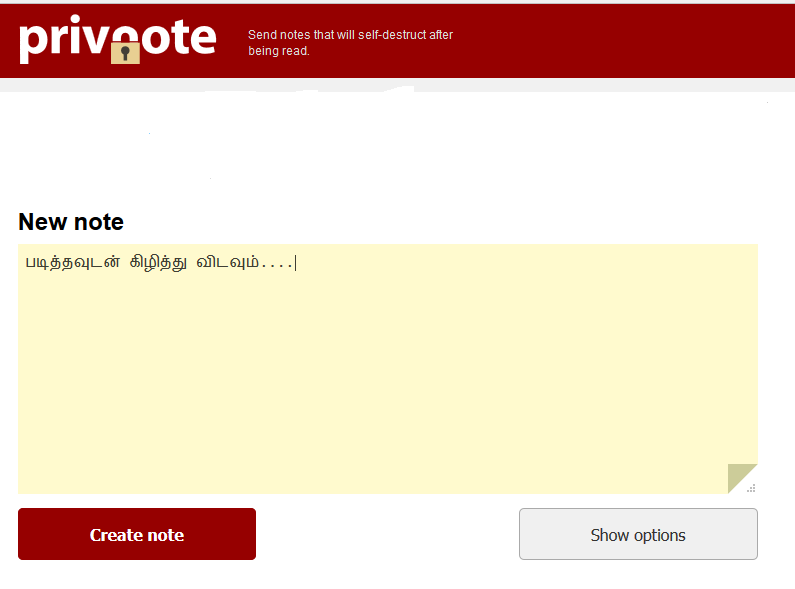
Privnote Website:

Through this website created message's are Automatically deleted after read By receiver.Receiver can't  read the particular message again and also you can create message with you can fix time when should the particular message to be delete.Besides these you can put password to your shared message.Receiver only read the message After you told the password

 How  to use this website

  • After type your message Click Create note option .
  • Then it will show one link through this link you can send the message to your friends.
  • Near of create Note option  there is another option called Show Option.
  • Click show option  now you can  determine the time when should the message to be delete 
Click Here to go to the website

Tuesday, 29 December 2015

How to start Android Phone's in Safe Mode?


We all know In Windows Computer for most of the problem Safe mode gives best solution.Similarly  we can start  smart phones also in safe mode.
What is safe mode?
Now a days smart phones are mostly affected by third person's app ony.so
If we start our smart phones in safe mode the third person's Applications are stopped.
 Android OS app's only run.

How to start safemode in SmartPhone:
It's Very simple Just press your power button on your mobile now the mobile shows power off,restart,and more option,now long press power off on your screen.now  it will ask you to
reboot to safe mode.press OK (Note:it is for latest versions of android only) 

For Older version of  Android mobile:
 start your phone with press volume up and down keys continuously.Then your phone will start in safe mode. 

HOW TO STOP WINDOWS 10 AUTO UPDATE